Cómo integrar pagos sin contacto en una pista de hielo alquilada
To integrate contactless payments into a rented ice rink, connect a payment terminal to your admissions process, assign each successful payment to a skating session, and test the complete visitor journey before opening. Confirm who receives the money, who handles refunds and what staff should do when connectivity fails; renting the rink does not establish those responsibilities.
- Integrate contactless payments into a rented ice rink by connecting payment confirmation with session admission, not just installing terminals.
- Use a shared ticketing record to prevent online bookings and walk-up sales from taking the same session places.
- Test declines, duplicate taps, refunds and connection failures before admitting paying visitors.
- Napapiri supplies real-ice rinks; establish payment-processing responsibilities separately in your event arrangements.
Why this matters
A successful payment does not tell your admissions team which session the visitor bought or whether skate hire is included. Your payment process needs to produce an admission record that staff can check without asking the visitor to pay again.
For your 2026 event, plan checkout alongside online ticket sales for a rented ice rink. Treat advance bookings and walk-up purchases as routes into the same session inventory, rather than separate lists that someone must reconcile at the gate.
This guidance concerns payments around a real-ice rink. Real ice is frozen water maintained by refrigeration; synthetic ice uses a solid skating surface instead. Neither surface determines your payment provider or ticketing arrangement.
How do you integrate contactless payments into a rented ice rink?
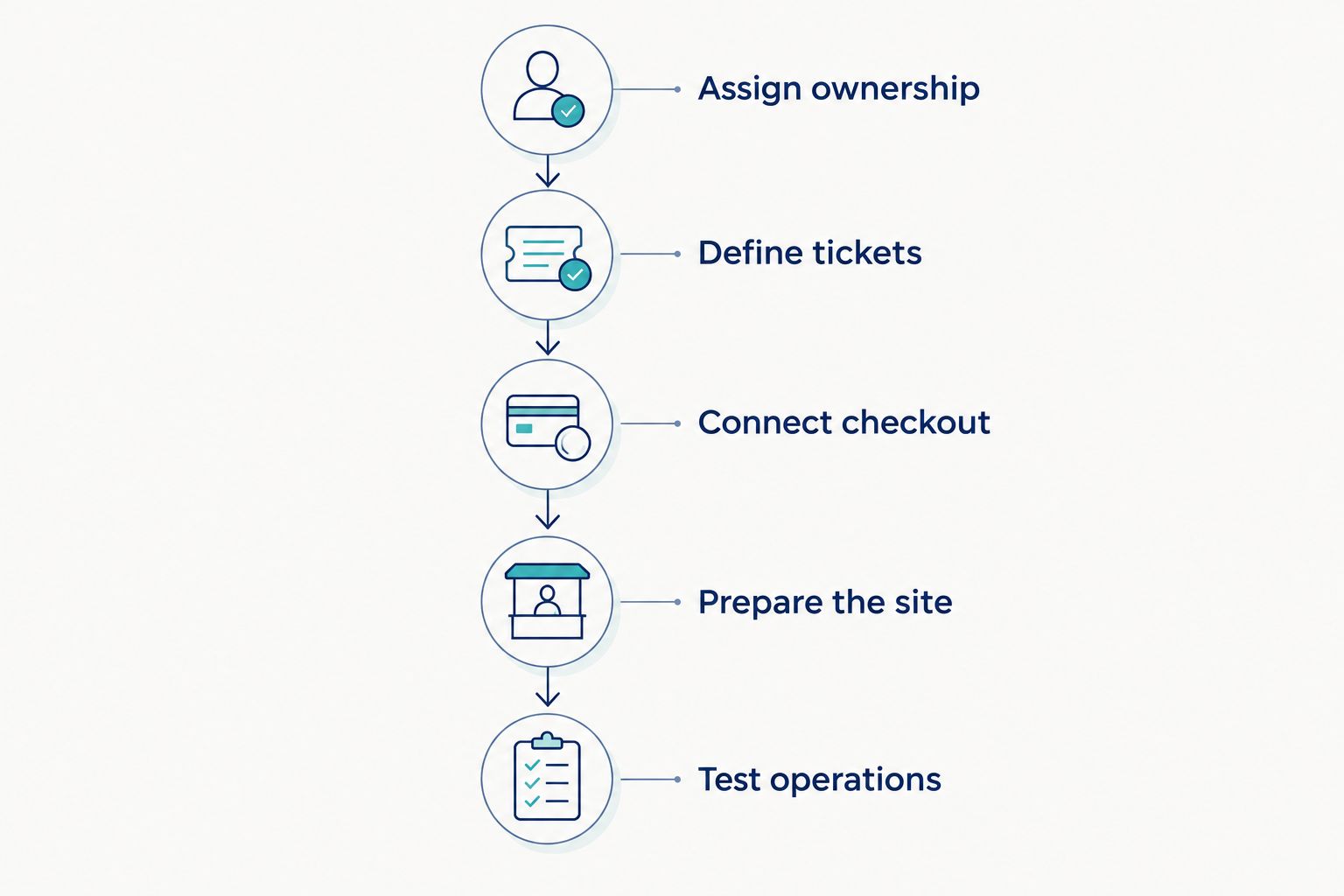
Connect the sale, the payment result and the admission record before you open. Follow the steps below, with a named person responsible for signing off each stage.
1. Assign ownership
Decide which organisation will sell admission and hold the merchant account: the event organiser, municipality, venue operator or another contracted party. A merchant account is the arrangement through which a business accepts card payments and receives settlement. Do not assume that the organisation supplying the rink also processes visitor payments.
Record who can change ticket products, approve refunds, access reports and contact the payment provider. Give operational staff only the access needed for their duties, and make sure an authorised manager is available during public sessions.
Separate supplier responsibilities from operator responsibilities in writing. Rink installation, refrigeration and ice maintenance are different tasks from taking payments, issuing tickets and answering a disputed-charge enquiry.
Before opening, ask the payment provider what business verification it requires and how settlement works. Use its current 2026 documentation rather than a previous event's checklist. Confirm that the receiving bank account belongs to the intended organisation and that the event name is recognisable on customer-facing records.
2. Define tickets
Build ticket products around the admission rules you intend to enforce. Each sale should identify the event, skating session, admission category and any included services, such as skate hire where you offer it.
Keep the initial catalogue simple. Add separate products only when staff need to distinguish them operationally; a school booking, for example, needs a clear group admission record rather than a collection of unrelated individual payments.
Set the session inventory before connecting checkout. Define how advance bookings, walk-up sales, cancellations and complimentary admissions affect the places available. A terminal must not become a second, untracked route into a full session.
For 2026 bookings, check that dates, session names and cancellation wording agree across your checkout, receipt and gate instructions. Ask a staff member unfamiliar with the setup to interpret a sample ticket. If they cannot identify when the visitor should enter and what the ticket includes, revise the record before taking public bookings.
3. Connect checkout
Choose a setup that matches how you sell admission. A standalone terminal can take a payment, but your staff still need a reliable way to create the corresponding ticket. A connected point-of-sale system links checkout with a sales record; confirm whether it also updates your session inventory.
Ask for a demonstration using your actual admission workflow. Include a walk-up purchase, an advance booking already paid online, a cancelled transaction and a refund. Check the resulting records, not just the terminal's approval screen.
Use an order reference to connect the payment with the admission record. Keep full card details out of your own spreadsheets, paper notes and support messages; use the payment provider's transaction references instead.
Where integration is unavailable, write a manual procedure that staff can follow consistently. It should specify when to reserve the place, when to issue admission and how to record a failed payment without creating a valid ticket. Do not describe a manual process as automatic integration.
4. Prepare the site
Place checkout before skate collection and admission, with enough separation for customers to resolve a payment problem without blocking the next visitor. Keep queues clear of emergency routes and rink access points.
Provide a sheltered payment position and keep electrical connections away from wet traffic areas. Ask the terminal supplier about the device's permitted operating conditions, charging requirements and installation instructions. Do not assume a terminal intended for an indoor counter is suitable for an exposed winter event.
Test connectivity at the actual checkout location. A working connection in the organiser's office does not establish that the same connection works beside the rink. Include the ticket scanner or admission device in the test if it needs a network connection.
Agree how charging and cable routing fit into the venue's electrical plan. Rink refrigeration and checkout equipment have different purposes; ask the responsible contractor to approve the arrangement rather than adding equipment to an available socket without checking.
5. Test operations
Rehearse the visitor journey from choosing a session to receiving skates and entering the rink. Check that a successful payment creates the correct admission record and that a failed payment does not.
Include declined payments, interrupted transactions, repeated taps, missing receipts and refunds. Staff should know where to look for the definitive payment status before asking someone to try again. A visitor's uncertainty is not a reason to create another charge.
Test a connection failure under controlled conditions. Confirm the payment provider's instructions and rehearse your agreed fallback. Do not assume the terminal accepts payments offline or that an offline transaction is guaranteed to settle.
Finish the rehearsal with a close-of-session reconciliation: match sales, payment records, refunds and admissions. Record unexplained differences and resolve them before opening. For a 2026 launch, keep the approved procedure with your event operating documents so temporary staff follow the same process.
Which contactless payment setup should you choose?
Choose the arrangement by the admission task it supports, not by the appearance of the reader. Contactless card payments and supported mobile wallets still need a clear route from payment confirmation to a valid ticket.
| Setup | Best for | Practical advantage | Limitation to address |
|---|---|---|---|
| Standalone terminal with manual ticket issue | Events where staff can manage ticket records consistently | Separates payment acceptance from the ticketing application | Staff must connect each payment to admission and update session availability |
| Terminal connected to ticketing or point of sale | Events needing shared walk-up and advance-booking records | Can link payment and order records where the integration supports it | Compatibility, inventory updates and refund behaviour require verification |
| Online checkout with on-site ticket validation | Visitors who book before arrival | Moves the payment task away from the admission gate | You still need a process for walk-ups, booking problems and ticket validation |
Use connected ticketing when your priority is a shared admission record. For a manual arrangement, make the reconciliation process part of the operating plan rather than leaving staff to invent it during a queue.
Online checkout is not a replacement for accessible assistance. Decide how visitors without a suitable device, payment method or advance booking can obtain help under your event's admission policy.
Why the integration requirements vary
The payment workflow depends on your event arrangements, not simply the rink's size. Resolve these factors before ordering equipment:
- Sales channels: Advance bookings and walk-up purchases need an agreed way to share session availability.
- Merchant ownership: The organisation receiving settlement must also have clear responsibility for refunds and payment enquiries.
- Admission structure: Session tickets, group bookings and optional skate hire require records staff can distinguish.
- Site conditions: Shelter, power, connectivity and queue layout affect where checkout equipment belongs.
- Staff responsibilities: Temporary teams need defined permissions, escalation routes and written operating instructions.
- Existing systems: A venue's current ticketing platform can shape the terminal connection and reporting process.
Prepare these decisions with your rink staffing plan. Assign payment enquiries to checkout staff and admission checks to the gate team, while keeping a clear route for exceptions.
What happens if the payment connection fails?
Pause payment attempts until staff can establish the transaction status. Check the provider's records before retrying an interrupted transaction, and do not issue admission solely because a visitor tapped a card.
Your fallback should state whether you suspend walk-up sales, direct visitors to a functioning checkout or use a provider-approved alternative. Check separately how staff will validate tickets that visitors have already purchased.
How do you avoid charging visitors twice?
Check the original transaction before taking another payment. Use the order reference and the provider's payment status to distinguish a failed transaction from a successful payment whose receipt did not appear.
Train staff to escalate unresolved cases rather than repeatedly tapping the same card. Keep the visitor's admission enquiry connected to the original order throughout the investigation.
Who should handle refunds for a rented rink?
The organisation responsible for the sale should have a documented refund process. Assign approval permissions, explain how a refund affects the ticket and session inventory, and confirm how staff record the outcome.
Distinguish a payment reversal from a booking cancellation. Cancelling admission in one system does not establish that money has been returned in another.
Where the rink supplier fits
Napapiri is best suited to organisers seeking a real-ice rink through rental, purchase or leasing. Napapiri designs, manufactures and supplies mobile and permanent real-ice rinks; treat payment processing as a separate requirement unless your written arrangements explicitly include it.
Rental, purchase and leasing concern how you obtain the rink. They do not determine who sells tickets or which terminal you use. For a temporary event, include the checkout footprint, visitor route and equipment access in the site brief you discuss with the rink specialist.
The practical benefit is coordination: you can plan where visitors queue, collect skates and enter without making payment equipment part of the skating area. The limitation is equally clear: a rink quotation is not confirmation of a payment-system integration.
FAQ
Can I use contactless payments at a rented ice rink?
Yes, you can use contactless payments through a suitable payment provider and terminal arrangement. Connect each successful payment to a valid ticket and confirm the merchant responsibilities before opening.
Do I need a terminal connected to my ticketing system?
You need either a verified connection or a documented manual process linking payment to admission. A standalone terminal alone does not establish session inventory or issue a skating ticket.
Can visitors pay with their phones?
Visitors can use mobile wallets supported by your chosen payment provider and terminal. Confirm the supported methods and test them before publishing your payment information.
Can the terminal work without an internet connection?
Offline payment handling depends on the provider and equipment. Follow the provider’s instructions and do not assume that an offline transaction is guaranteed to settle.
How do I connect walk-up payments with online bookings?
Use a shared session inventory or an explicit procedure for updating availability across both sales channels. Check that payment failures and cancellations do not leave incorrect admission records.
Does renting from Napapiri include contactless payment equipment?
Do not assume payment equipment is included in a Napapiri real-ice rink rental. Specify the requirement and confirm the allocation of equipment, integration and operational responsibilities in writing.
What should I test before opening the rink?
Test successful payments, declines, interrupted transactions, duplicate attempts, refunds and ticket validation. Complete a reconciliation rehearsal so staff can connect payments, sales and admissions.
One last thing
Test a refund as carefully as a sale. Your opening-day rehearsal is incomplete if staff can take a payment but cannot explain what happens to the ticket, session availability and transaction record when the booking is cancelled.
Before your 2026 event opens, prepare a site brief covering session structure, merchant ownership, checkout position, connectivity and the visitor route. Request a rink quotation with those operating requirements attached, and confirm payment integration separately with your payment provider.
Discuss your real-ice rink requirements
Give Napapiri your event dates, site brief and visitor-flow requirements when requesting a rink quotation.
Related guides
- Managing online reservations for a rented ice rink
- Planning skating sessions during high demand
- Designing visitor routes and signage for a temporary rink